01The idea
The play is the space three peers leave between them.
Nobody draws the play button in the Empractica mark. It appears when three hexagons meet. That is the company in one shape: CEOs facing the same decisions, meeting every other week, and leaving with something to try.
The remaster keeps that idea and gives it the precision to carry a whole system. The play becomes the brand’s one pointer, marking the next action on every page, slide and screen.
A useful AI idea, taught and shown in a live demo.
A guided exercise works out where it fits your business.
The next step happens back at work.
Kept
- Mark
- Three hexagons, and the play button they leave between them.
- Name
- Lowercase, geometric, with the double-storey a.
- Color
- Bright Blue on white and Cool Black. Blue stays the accent.
- Voice
- Plain, direct, adult. No hype and no exclamation points.
Redrawn
- Mark
- Same silhouette. Slimmer joints, tighter corners, a crisp play.
- Name
- Set in The Future, Klim’s Futura, at a custom weight.
- Color
- Blue moved 5 ΔE for contrast, with a full perceptual palette behind it.
- System
- A lattice, a play pointer, a grid, and rules for every surface.
02Logo
Same mark, drawn on its own geometry.
Use the horizontal lockup first. The stacked lockup is for square and tall spaces, and the mark alone is for icons, avatars and places where the name is already present.








On every side. R is the side of one hexagon in the mark, about half the height of the lowercase letters.
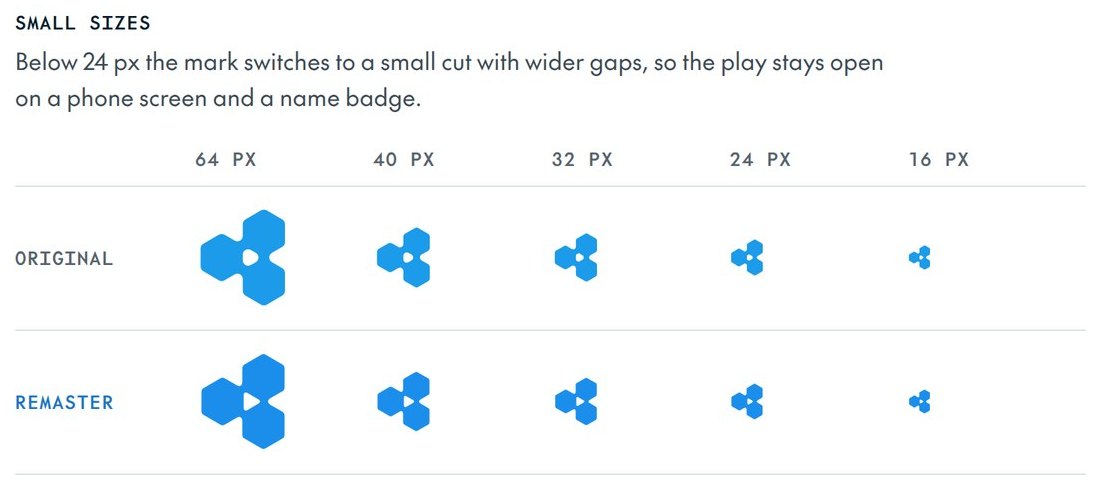
Width of the lockup. The mark alone goes down to 16 px using the small cut.
Wider gaps keep the play open on a phone screen, a favicon and a name badge.
Construction
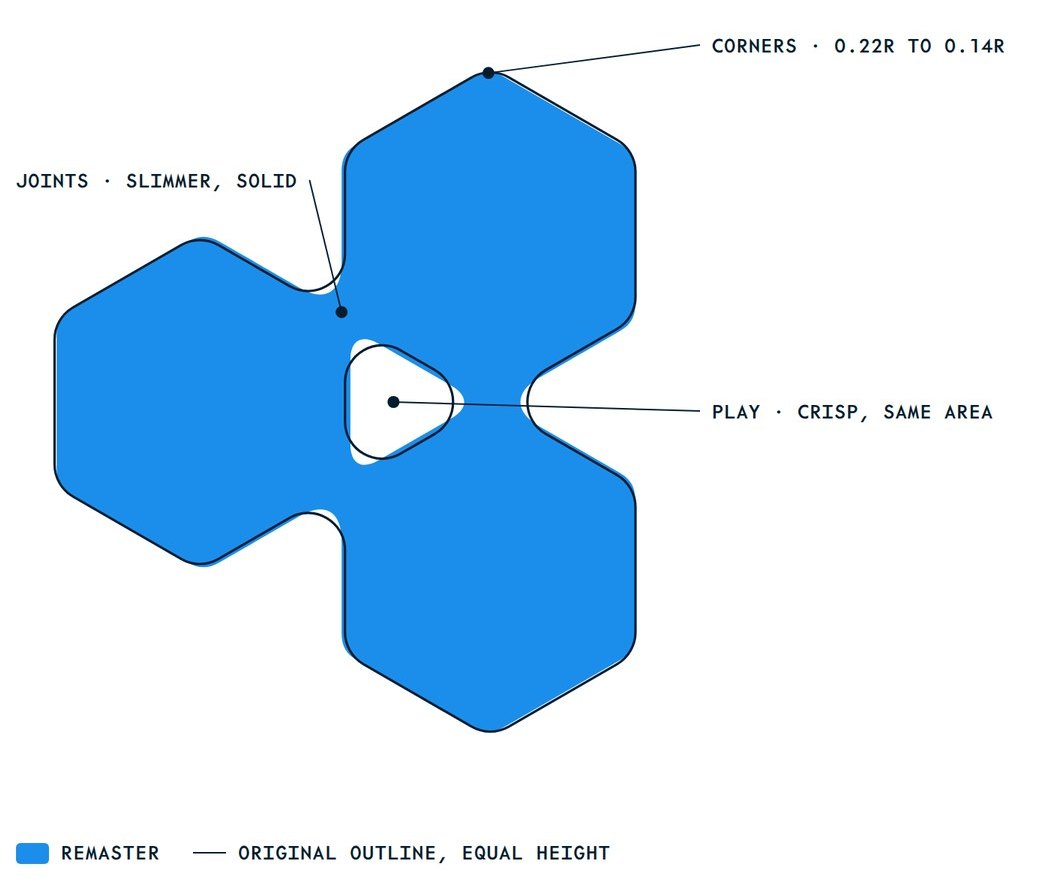
The original is three hexagons touching tip to tip, with one soft radius on every corner. Because the tips only touch, that big radius has to hold the shape together, so the joints swell and the play rounds into a blob. The remaster overlaps the hexagons by 3%, which lets every corner tighten and the play sharpen. Every point has a number, so any designer, printer or sign maker can rebuild it.
- Unit
- R, the side of one hexagon.
- Centers
- 1.94R apart, 3% closer than tip to tip.
- The play
- A true equilateral triangle, side 0.88R, on the center of mass.
- Corners
- Outer 0.14R, notch 0.12R, play 0.08R, all with continuous curvature.
- Overall
- 3.41R by 3.89R. The original is 3.46R by 3.93R, so the proportions hold.
Don’t
Fill the play
The play is space, not a shape. Never put a color in it.
Rotate it
The play always points right, toward the next move.
Stretch it
Scale the mark only in proportion.
Add effects
No shadows, glows, bevels or gradients on the mark.
Recolor the hexagons
One color for the whole mark. Blue, Ink, white or black.
Lose the contrast
Blue on Dark Blue disappears. Use white on dark grounds.
The wordmark is drawn, not typed. Never retype empractica in a font, change the spacing, or move the mark to the other side of the name.
03Color
Five colors you know, with a range behind them.
The palette is the original one, measured and rebuilt in OKLCH so every tint and shade sits on the same hue. Tap any value to copy it.
Bright Blue
The mark, the one action per view, focus, the play
- HEX
- RGB
- 27 142 236
- OKLCH
- 63.5% 0.170 250
Cool Black
Type, and the Ink band (one per page)
- HEX
- RGB
- 3 29 46
- OKLCH
- 22.1% 0.046 241
Dark Blue
Depth, charts, the gradient
- HEX
- RGB
- 13 66 101
- OKLCH
- 36.5% 0.080 243
Cool Gray
Panels and washes
- HEX
- RGB
- 231 236 240
- OKLCH
- 94.0% 0.008 242
Paper
Pages and space
- HEX
- RGB
- 255 255 255
- OKLCH
- 100.0% 0.000 90
Proportion · about 60% white and fog, 30% Ink, 10% blue
On Ink
Functional · red is for errors only
Data · charts only, in this order
The gradient · once per page, mixed in OKLCH
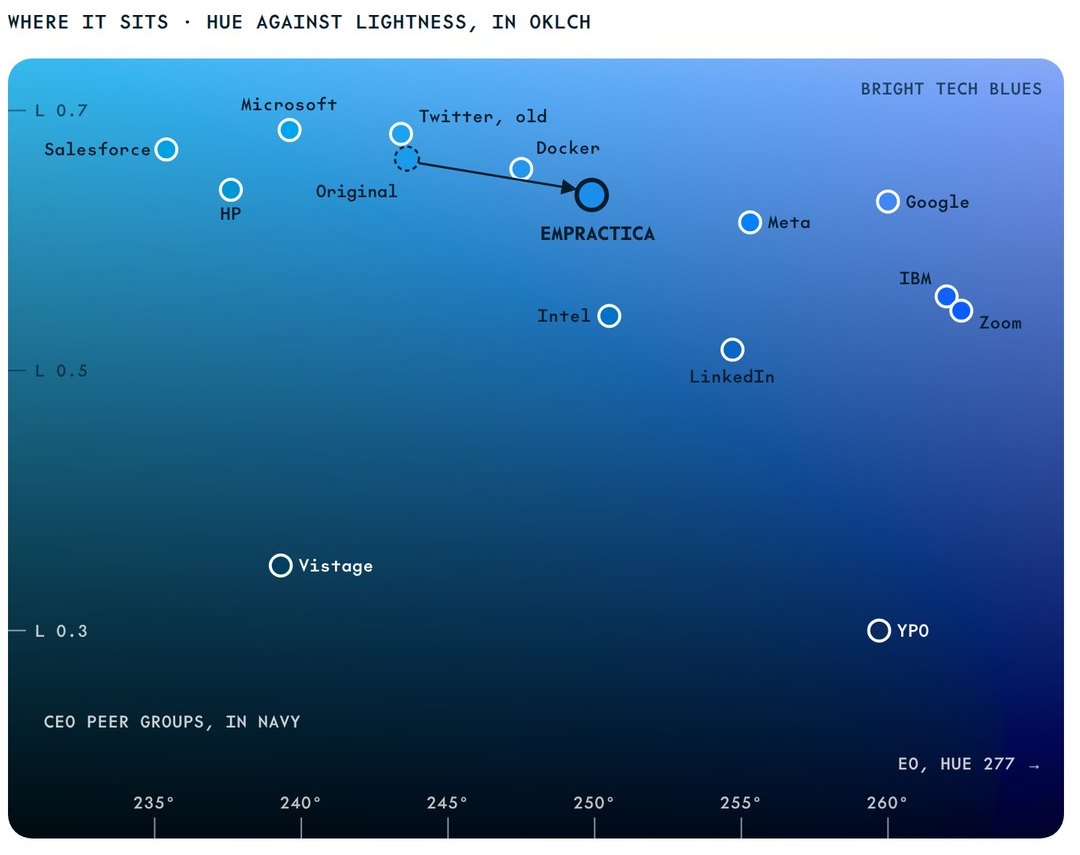
The same blue, tuned to work harder
| Original | Remaster | |
|---|---|---|
| Hex | #1B9BEA | #1B8EEC |
| OKLCH | 66.3% 0.155 244 | 63.5% 0.170 250 |
| White on it | 3.03 : 1 | 3.43 : 1 |
| Ink on it | 5.68 : 1 | 5.03 : 1, passes AA |
| Family hue | Blues 235 to 244, gray 229 | All on 241 to 250 |
The move is 5 ΔE, about the step between two printings of the same ink. On wide-gamut screens the CSS shows the same blue with more chroma, color(display-p3 0.184 0.541 0.960).
Starting values for a press proof. CMYK is the closest four-color build on coated paper. Pantone is the closest Solid Coated ink. A physical Pantone guide and a proof on the real paper make the final call.
| Color | Screen | CMYK, coated | Pantone | Note | |
|---|---|---|---|---|---|
| Bright Blue | #1B8EEC | Process cannot reach the screen blue (about 3.7 dE00 short in saturation). Use the spot ink where the blue matters. | |||
| Cool Black | #031D2E | Cool rich black for solids and large type. Type under 10 pt prints in one ink: PANTONE 296 C or K100. | |||
| Dark Blue | #0D4265 | PANTONE 2188 C ties on screen; compare both on the guide. | |||
| Cool Gray | #E7ECF0 | No Pantone ink is within 2 dE00, and all candidates print darker. Prefer the CMYK build or a tint. |
Four-color process can’t reach the screen blue. Wherever the blue carries the piece, as on cards, covers and the booth, print it as PANTONE 279 C. On uncoated paper, ask for the same inks, 279 U and 296 U, and judge them on a drawdown.
Contrast
| Pair | Ratio | WCAG 2 | Use | |
|---|---|---|---|---|
| Aa | Cool Black on Paper | 17.23 | AA | Headlines and text |
| Aa | Fog 700 on Paper | 9.13 | AA | Body copy |
| Aa | Fog 600 on Paper | 6.25 | AA | Captions and labels |
| Aa | Blue 600 on Paper | 4.77 | AA | Text links |
| Aa | Blue 700 on Fog 50 | 6.08 | AA | Links on washes |
| Aa | Bright Blue on Paper | 3.43 | Large text | Icons, the play, 24 px type and up |
| Aa | White on Cool Black | 17.23 | AA | Text on Ink, primary button |
| Aa | Ink text 2 on Cool Black | 10.20 | AA | Body copy on Ink |
| Aa | Cool Black on Bright Blue | 5.03 | AA | The button on Ink |
| Aa | White on Bright Blue | 3.43 | Large text | Only for type 24 px and up |
04Typography
One family, from the logo to the footnote.
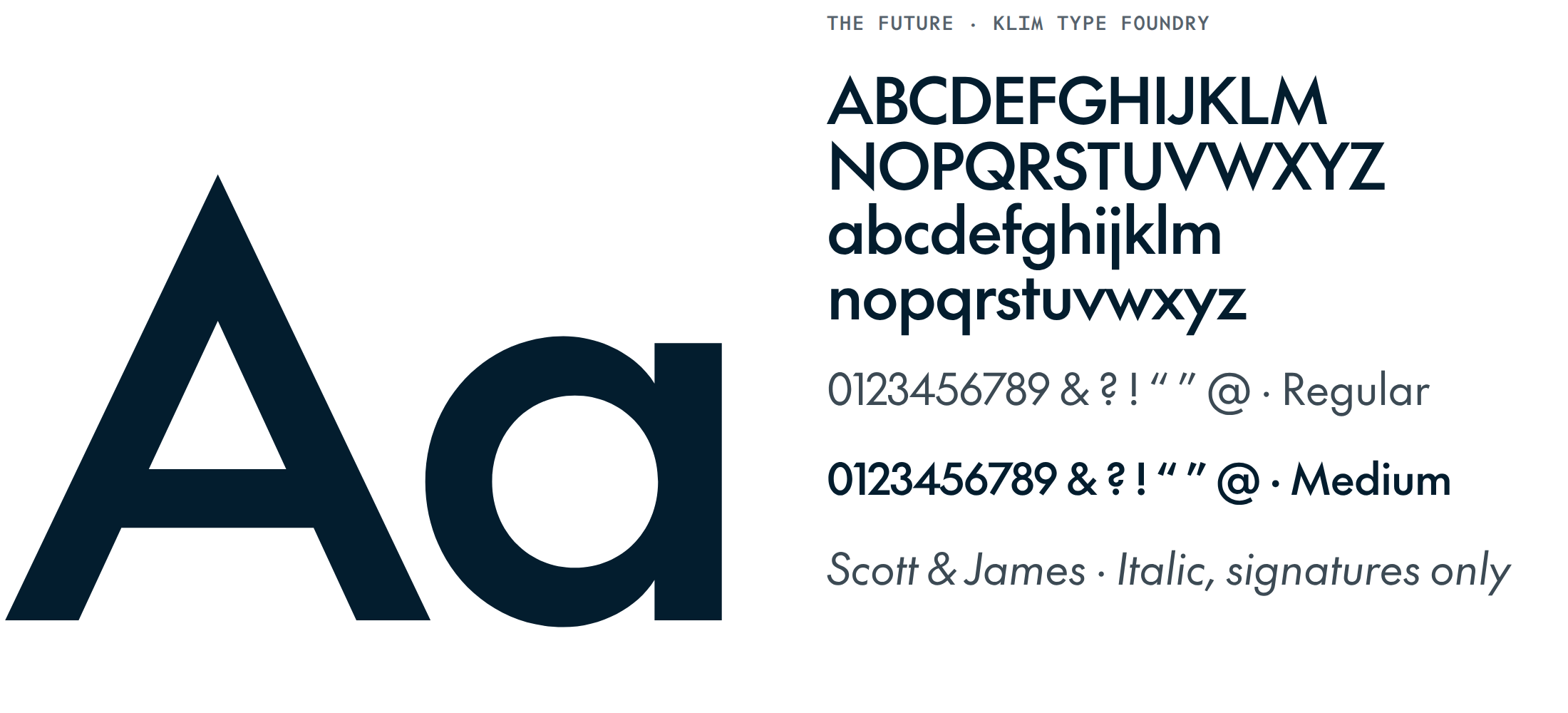
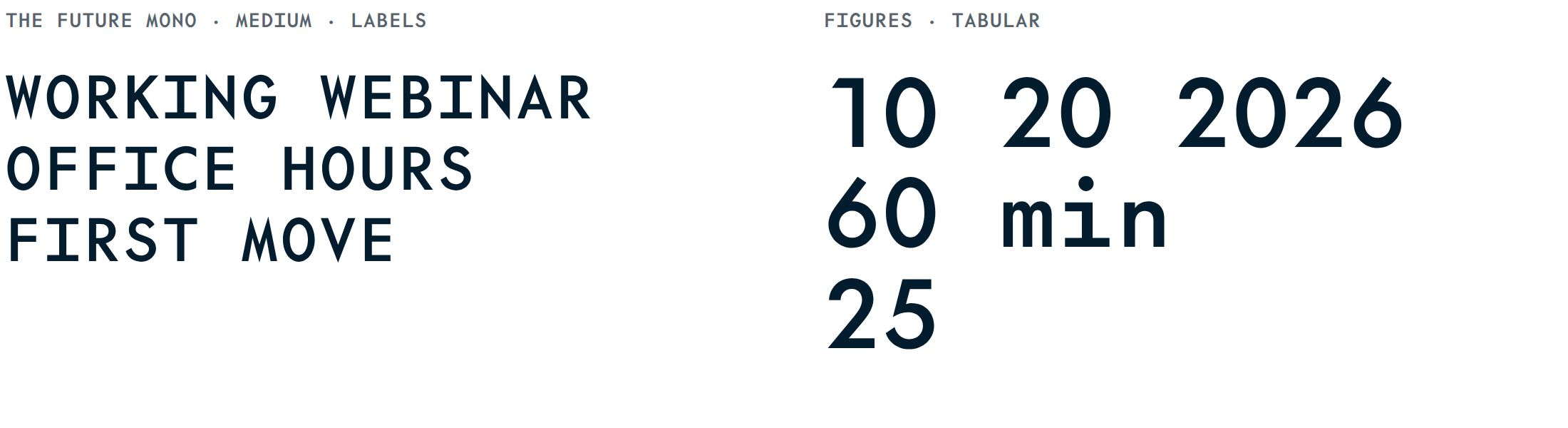
The Future is Kris Sowersby’s homage to Paul Renner’s Futura, drawn from Renner’s original production drawings, with a monospaced companion, The Future Mono. The original wordmark was already a Futura-style geometric, so the shape people know stays. What changes is the finish.
The scale
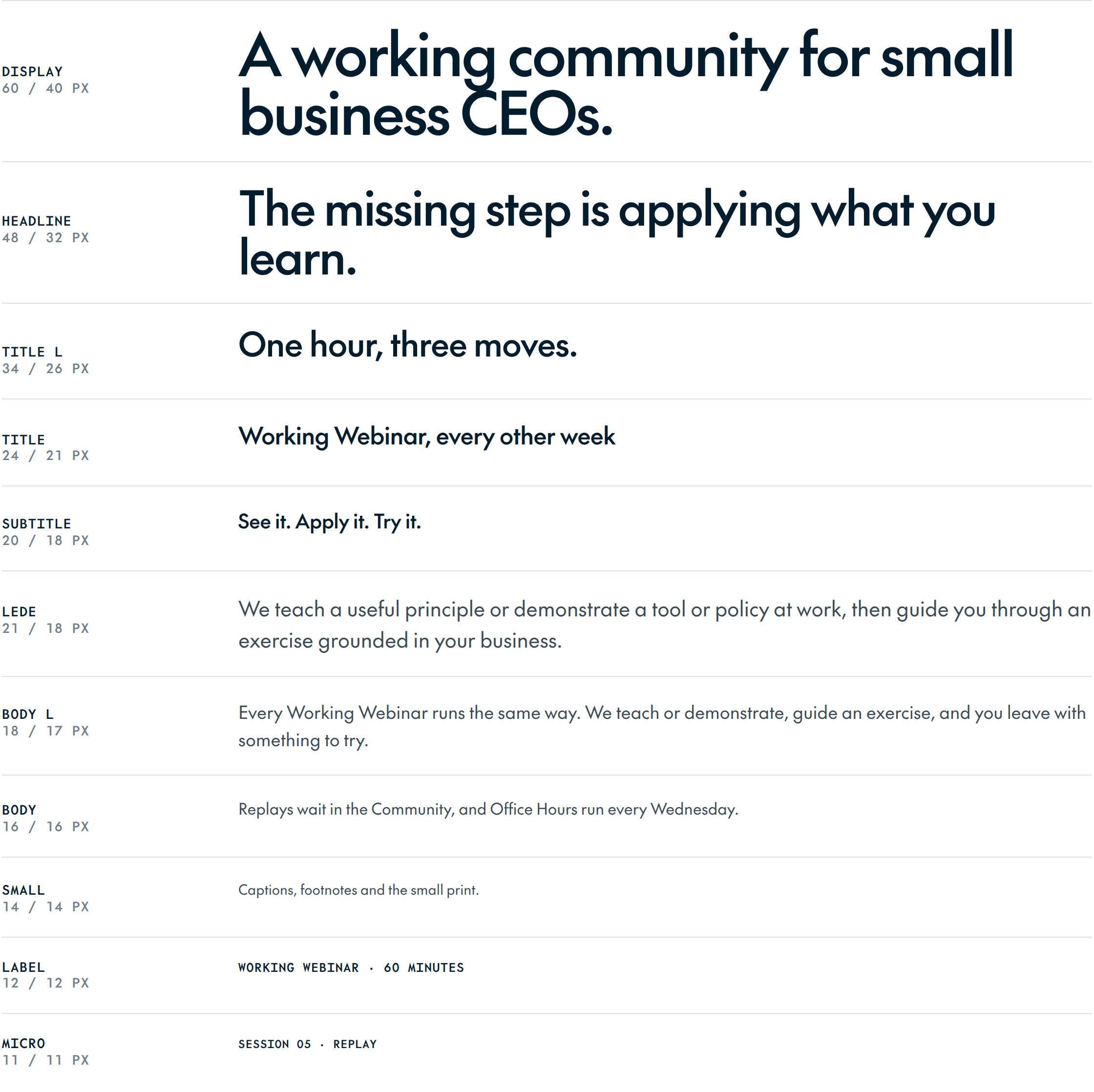
| Token | Role | Face | Desktop / mobile px | Leading | Tracking | Use |
|---|---|---|---|---|---|---|
display | Display | The Future Medium | 60 / 40 | 1.0 | -3.4% | Home hero. One per page. |
headline | Headline | The Future Medium | 48 / 32 | 1.04 | -3.0% | Page titles and section heads. |
title-lg | Title L | The Future Medium | 34 / 26 | 1.1 | -2.0% | Band titles, large cards. |
title | Title | The Future Medium | 24 / 21 | 1.2 | -1.5% | Card titles, subsections. |
subtitle | Subtitle | The Future Medium | 20 / 18 | 1.3 | -1.0% | Small headings, list heads. |
lede | Lede | The Future Regular | 21 / 18 | 1.5 | -0.5% | The paragraph under a headline. |
body-lg | Body L | The Future Regular | 18 / 17 | 1.55 | -0.4% | Long reading on marketing pages. |
body | Body | The Future Regular | 16 / 16 | 1.55 | -0.4% | Default text, UI, email. |
small | Small | The Future Regular | 14 / 14 | 1.45 | +0.0% | Captions, footnotes, legal. |
label | Label | The Future Mono Medium | 12 / 12 | 1.4 | +7.0% | Eyebrows, field labels, tags. |
micro | Micro | The Future Mono Medium | 11 / 11 | 1.35 | +6.0% | Dense UI and chart axes only. |
- Two weights. Medium for display, headings and the button. Regular for everything you read.
- Sentence case for every headline, button and title.
- Labels in The Future Mono Medium, uppercase, tracked +7%.
- Figures for dates, times and counts in The Future Mono, tabular.
- Line length around 65 characters for running text.
- No italics or bold for emphasis in body copy. Rewrite the sentence instead.
Getting the fonts
The Future and The Future Mono are commercial fonts from Klim Type Foundry, so they aren’t in the downloads. If you’re making something for Empractica, ask your Empractica contact for access, or license them from Klim.
The companions: Jost and DM Mono
Google Slides, Docs and Gmail can’t load The Future. There, use Jost for text and DM Mono for labels. Both are free on Google Fonts and close in shape.
See it. Apply it. Try it.
Working Webinar 01
Jost Regular and Medium · DM Mono Medium. Type labels in capitals, because Google apps don’t apply the uppercase style.
05Signature graphics
Four devices, one source.
Everything comes from the mark. Use them on purpose, one job each, and they will make Empractica recognizable without the logo in sight.
01The lattice
The mark repeated becomes a field of peers, with a play between every three. Backgrounds, covers, slides and booths. It fades out from one hub, and the mark is lit in its three cells in one place per page.
02The play pointer
One Bright Blue triangle marks the next action. One per view, and never decoration.
03Session hexes
Every Working Webinar gets a numbered cell, so replays, slides and stickers line up. Filled cells are done, the blue cell is today.
04The outline
The mark as a single line at architectural scale. It replaces the old watermark, drawn exactly.
On Paper
The lattice works on white too, in Cool Gray cells. Keep type off the densest part of the field, and let it fade before it reaches the text.
- One lit mark per page, slide or layout.
- One gradient per page.
- One play pointer per view.
06Icons
Drawn for the brand, on hexagon angles.
24 px grid, 1.5 px stroke, round caps and joins. The play is the only filled shape. Brand icons name the things members do; utility icons run the interface.
assistantbriefcalendarfirst-movemeasuremeetingsmembersnumbersoffice-hourspolicyreplayroundtabletemplatewebinararrow-rightarrow-up-rightchevron-downcheckclosemenuplusminusmailinfodownloadplay07Layout and interface
Premium is mostly spacing and restraint.
Kept from the current site: the 1200 shell, the eyebrow rule and the easing curve. Dropped: pill buttons and drop shadows.
12 columns in a 1200 px shell with 24 px gutters. Page margins from 20 to 64 px. One idea per band.
Bands breathe at 96 to 128 px.
White pages, Fog 50 washes, Fog 100 panels, and one Ink band per page.
Never fully round. Edges show structure, not elevation.
Eyebrow · blue rule, mono label
450 ms for reveals and 160 ms for hovers, on ease (.22, .61, .36, 1). Nothing moves when a visitor asks for reduced motion.
Components
Live, built from the tokens.
An assistant that knows your business
Tuesday, October 20, 2026
08Voice
Plain, direct, adult.
Empractica sounds like a peer who has done the work: plain, direct and adult, with no hype and no exclamation points. Each line below has one job.
Plain, direct, adult. Say what happens in the session.
No hype and no exclamation points. Confidence comes from specifics.
Never invent proof. Empty proof slots stay empty until a member says yes.
Brand line
See it. Apply it. Try it.
How every Working Webinar runs, in six words.
Descriptor
A working community for small business CEOs.
Says what Empractica is and who it is for. It leads every first impression.
The problem
The missing step is applying what you learn.
The argument for the format, in one line.
09Tokens
One source for every color, size and curve.
Generated from a single spec, so the CSS, the JSON, the Tailwind preset and the swatches can’t drift apart.
In the color and tokens download · empractica-tokens.css · empractica-tokens.json · tailwind.preset.js · empractica-palette.ase · contrast.md
10Downloads
Every file, ready to use.
The same files this page shows, drawn from one source. Use them as they are, and don’t redraw, retype or recolor the logo.
- ZIP · 1.7 MBDownload Logo files, 1.7 MB
Logo files
The lockup and stacked lockup in six color schemes, plus the wordmark and the mark, as SVG, PDF and PNG. Favicons, app icons and social avatars.
- ZIP · 110 KBDownload Print files, 110 KB
Print files
The logo for printers and sign makers, in CMYK process builds and Pantone spot inks, as PDF and EPS.
- ZIP · 10 KBDownload Color and tokens, 10 KB
Color and tokens
CSS custom properties, design tokens in JSON, a Tailwind preset, Adobe swatches with the print inks, and the contrast table.
- ZIP · 247 KBDownload Icons, 247 KB
Icons
26 icons on a 24 px grid, as SVG and PNG, with a sprite and a JSON index.
- ZIP · 1.3 MBDownload Signature graphics, 1.3 MB
Signature graphics
The lattice fields and tiles, the play pointer, session hexes, the outline mark and the gradient, as SVG and PNG.
Fonts aren’t included. The Future and The Future Mono are licensed from Klim Type Foundry; see Typography.